OpenSandbox: What It Is, AI Agent Sandbox & Docker/K8s Setup Guide
What is OpenSandbox? Explore Alibaba's open-source universal sandbox (alibaba/OpenSandbox) to safely isolate AI coding agents in Docker and Kubernetes.
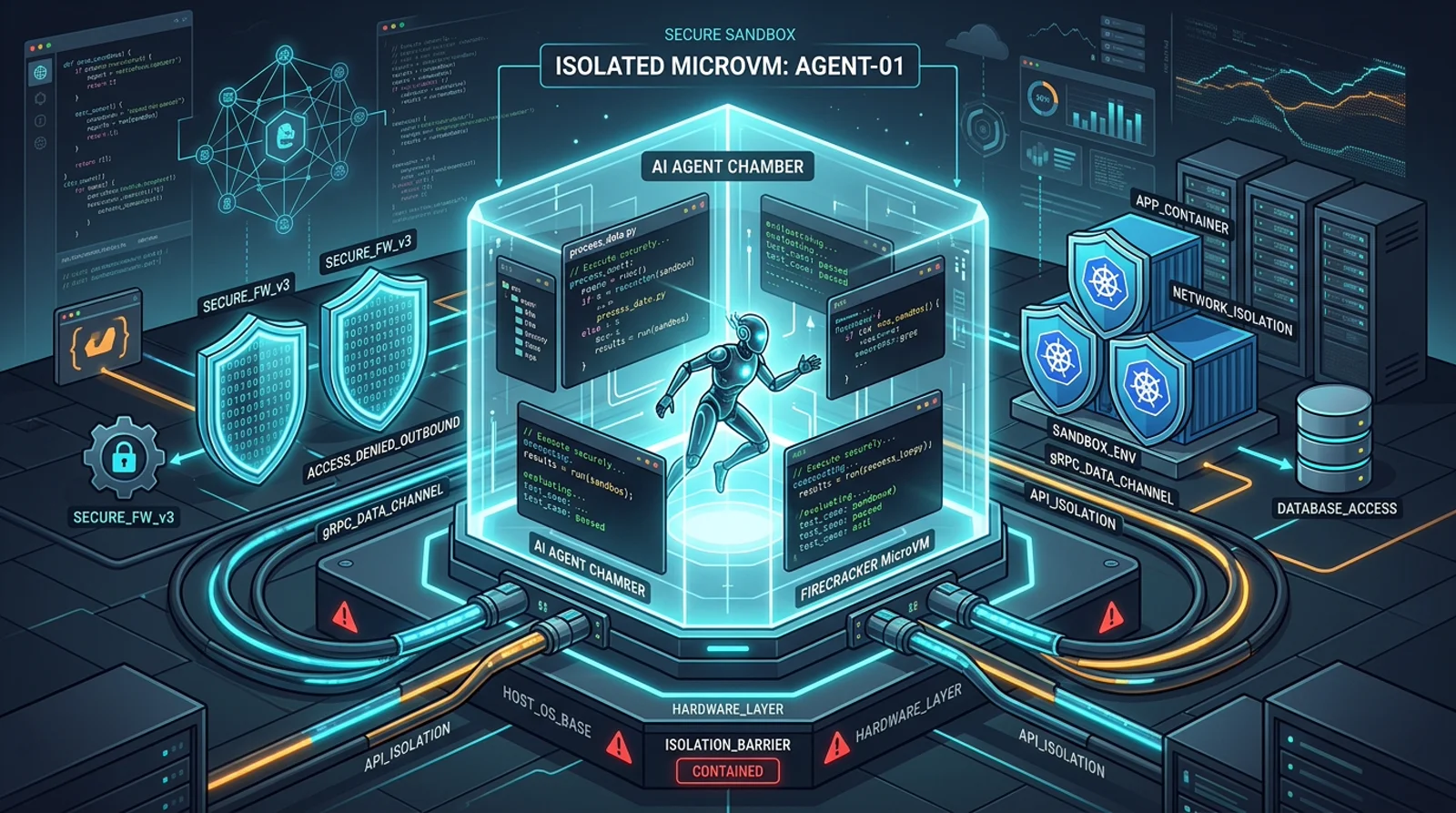
OpenSandbox by Alibaba is an open-source, universal sandbox platform that provides standardized execution environments for AI agents across Docker and Kubernetes.
TL;DR
Quick Answer Box (Google Search Featured Snippet):
- What is OpenSandbox? An open-source, universal execution sandbox and protocol (
alibaba/OpenSandbox) providing standardized, isolated environments for AI coding agents, browser automation, and reinforcement learning workloads.- Why do AI agents need OpenSandbox? Autonomous agents frequently execute shell commands, run tests, and manipulate files. Running untrusted code on raw host machines risks system corruption or credential leakage; OpenSandbox isolates workloads in Docker or Kubernetes using gVisor, Kata Containers, or Firecracker microVMs.
- Multi-Language Support: Official SDKs for Python, TypeScript/JavaScript, Java, and C#.
- Official Repository: alibaba/OpenSandbox on GitHub.
- Best for: Developers running autonomous agents like Claude Code, Gemini CLI, or LangGraph without risking host system integrity.
- Why it matters: Eliminates bespoke, fragile sandbox implementations by exposing a unified API for local Docker and Kubernetes pods.
Repository: alibaba/OpenSandbox
Beginner Map
Do not approach OpenSandbox like a pile of container scripts. Think of it as a three-tier stack: Multi-Language SDK → Open Protocol Server → Isolated Container/microVM.
- Pass 1: Part 1 - the universal socket mental model (why isolated runtime matters).
- Pass 2: Part 2 - architecture deep dive, gVisor/Kata isolation, and OSEP protocol.
- Pass 3: Part 3 - problems solved (SDK uniformity, laptop-to-K8s scaling).
- Pass 4: Part 4 - 3-step quickstart and running your first sandbox execution.
| Term | Question it answers |
|---|---|
| Server | Who creates, manages, and cleans up sandbox containers? |
| SDK | How does my Python/TypeScript agent talk to the sandbox? |
| gVisor / Kata | What keeps a rogue script off my host machine? |
| OSEP | How does the sandbox protocol evolve community standards? |
| Docker vs K8s | How do I prototype locally and scale to thousands of cloud agents? |
Student First Assignment
- Install
opensandbox-servervia uv/pip on your workstation. - Initialize the default Docker configuration via
opensandbox-server init-config ~/.sandbox.toml --example docker. - Spin up the server with
opensandbox-serverand execute the Python script from Part 4 to run an isolatedecho 'Hello OpenSandbox!'. - Verify that the test container spins up, outputs the text, and is cleanly destroyed without leaving orphan processes.
Part 1: Foundations - The Mental Model
Imagine you are an AI agent. You need to write code, run it, browse the web, interact with a desktop, maybe even train a model - all in a safe, isolated environment. The host system must not be affected, yet you need full power within the box.
That is exactly what OpenSandbox by Alibaba provides.
Mental Model: Think of OpenSandbox as a universal remote-controlled sandbox - a standardized socket into which any AI agent (Claude Code, Gemini CLI, LangGraph, Google ADK, etc.) can plug. The sandbox wraps Docker containers or Kubernetes pods and exposes one consistent API for creating environments, running commands, managing files, and interpreting code.
Instead of each AI framework inventing its own execution sandbox, OpenSandbox offers a single, open protocol that all of them can share.
Part 2: The Investigation - Architecture Deep Dive
The Layered Architecture
OpenSandbox is structured into clear layers, each solving one concern:
Architectural model of OpenSandbox lifecycle orchestration and secure multi-runtime isolation:

Project Structure
| Directory | Purpose |
|---|---|
sdks/ |
Client SDKs (Python, JS/TS, Java, C#) |
specs/ |
OpenAPI + OSEP (OpenSandbox Enhancement Proposals) |
server/ |
The core sandbox server |
kubernetes/ |
Kubernetes runtime for distributed scheduling |
components/execd/ |
Execution daemon inside the sandbox container |
components/ingress/ |
Ingress gateway with multi-routing strategies |
components/egress/ |
Per-sandbox egress/network policy control |
sandboxes/ |
Pre-built sandbox images |
examples/ |
End-to-end integration examples |
Sandbox Protocol (OSEPs)
OpenSandbox uses a formal proposal process called OSEP (OpenSandbox Enhancement Proposals) to evolve the platform. This is similar to PEPs in Python, keeping the protocol community-driven and well-documented. The protocol defines two classes of APIs:
- Lifecycle APIs:
create,start,pause,resume,kill→ manages the sandbox container - Execution APIs:
commands.run,files.write,files.read,codes.run→ interacts with what’s inside
Security - Strong Isolation Options
This is where OpenSandbox stands apart from naive Docker-only sandboxes. It natively supports secure container runtimes:
- gVisor - userspace kernel that intercepts system calls
- Kata Containers - lightweight VMs with hardware isolation
- Firecracker microVMs - ultra-fast micro-virtual machines (used by AWS Lambda)
Each provides progressively stronger isolation guarantees between sandbox workloads and the host.
Part 3: The Diagnosis - What It Does for Developers
Problem 1: Every AI Agent Framework Reinvents the Same Sandbox
Before OpenSandbox, if you wanted to run Claude Code, Gemini CLI, and LangGraph safely side-by-side, you would need three different sandbox integration layers. OpenSandbox unifies them under one protocol.
Problem 2: Scaling From Laptop to Kubernetes Is Hard
OpenSandbox’s Docker runtime is for local development. Its Kubernetes runtime (kubernetes/) handles distributed, large-scale scheduling of thousands of sandboxes - without changing a single line of your application code. The same SDK calls work locally and in production.
Problem 3: Multi-Language Teams Need Multi-Language SDKs
Currently supported SDKs:
| Language | Status |
|---|---|
| Python | ✅ Stable |
| JavaScript / TypeScript | ✅ Stable |
| Java / Kotlin | ✅ Stable |
| C# / .NET | ✅ Stable |
| Go | 🔜 Roadmap |
Real-World Use Cases
| Scenario | Example |
|---|---|
| Coding Agent | Claude Code, Gemini CLI, OpenAI Codex CLI |
| LLM Workflow | LangGraph state machines creating sandbox jobs |
| GUI Automation | Headless Chrome + Playwright in a sandbox |
| Desktop Environment | VNC + full Linux desktop inside a container |
| Remote Dev | VS Code (code-server) serving from a sandbox |
| RL Training | Run training episodes in isolated containers |
| Agent Evaluation | Reproducible, isolated eval environments |
Part 4: The Resolution - How to Use OpenSandbox
Quickstart in 3 Steps
Step 1 - Install and configure the server
uv pip install opensandbox-server
opensandbox-server init-config ~/.sandbox.toml --example docker
Step 2 - Start the sandbox server
opensandbox-serverStep 3 - Create a sandbox and run code
import asyncio
from datetime import timedelta
from code_interpreter import CodeInterpreter, SupportedLanguage
from opensandbox import Sandbox
from opensandbox.models import WriteEntry

async def main() -> None:
    # 1. Create a sandbox from a Docker image
    sandbox = await Sandbox.create(
        "opensandbox/code-interpreter:v1.0.1",
        entrypoint=["/opt/opensandbox/code-interpreter.sh"],
        env={"PYTHON_VERSION": "3.11"},
        timeout=timedelta(minutes=10),
    )

    async with sandbox:
        # 2. Run a shell command
        execution = await sandbox.commands.run("echo 'Hello OpenSandbox!'")
        print(execution.logs.stdout[0].text)   # Hello OpenSandbox!

        # 3. Write a file
        await sandbox.files.write_files([
            WriteEntry(path="/tmp/hello.txt", data="Hello World", mode=644)
        ])

        # 4. Read it back
        content = await sandbox.files.read_file("/tmp/hello.txt")
        print(f"Content: {content}")  # Content: Hello World

        # 5. Run Python code inside the sandbox
        interpreter = await CodeInterpreter.create(sandbox)
        result = await interpreter.codes.run(
            """
            import sys
            print(sys.version)
            result = 2 + 2
            result
            """,
            language=SupportedLanguage.PYTHON,
        )
        print(result.result[0].text)       # 4
        print(result.logs.stdout[0].text)  # 3.11.x

    # Sandbox auto-cleaned up
Integrating with a Coding Agent (Google ADK Example)
# examples/google-adk: use OpenSandbox as the tool backend for a Google ADK agent
from google.adk.tools import BaseTool
from opensandbox import Sandbox

class SandboxRunTool(BaseTool):
    async def run_in_sandbox(self, code: str) -> str:
        sandbox = await Sandbox.create("opensandbox/code-interpreter:v1.0.1")
        async with sandbox:
            interpreter = await CodeInterpreter.create(sandbox)
            result = await interpreter.codes.run(code, language=SupportedLanguage.PYTHON)
            return result.result[0].text
Running Claude Code or Gemini CLI in a Sandbox
# Clone the examples
git clone https://github.com/alibaba/OpenSandbox.git
cd OpenSandbox/examples/claude-code  # or gemini-cli, codex-cli, etc.

# Follow the README in each example directory
Each example ships with a Dockerfile and a startup script that drops the specified AI CLI tool inside a fully managed OpenSandbox environment.
Final Take
┌────────────────────────────────────────────────────────────┐
│                        OpenSandbox                         │
│                                                            │
│  "A universal socket for AI agent execution"               │
│                                                            │
│  What it IS:                                               │
│  → Open protocol sandbox with lifecycle + execution APIs   │
│  → Multi-language SDKs (Python, JS, Java, C#)             │
│  → Docker local dev + Kubernetes production scaling        │
│                                                            │
│  What it SOLVES:                                           │
│  → Fragmented sandbox implementations per AI framework     │
│  → Unsafe code execution without isolation                 │
│  → Scaling from laptop to cloud without code changes       │
│                                                            │
│  What it ENABLES:                                          │
│  → Coding agents (Claude, Gemini, Codex)                   │
│  → GUI agents (Chrome, Playwright, VNC)                    │
│  → RL training + agent evaluation                          │
│  → Remote dev (VS Code inside a sandbox)                   │
│                                                            │
│  Isolation options: gVisor | Kata Containers | Firecracker │
└────────────────────────────────────────────────────────────┘
The greatest risk of autonomous AI agents is not that they write bad code - it is that they execute unchecked commands on the host environment. Hand-rolling ad hoc Docker wrappers for every new framework creates fragile, leaky systems. OpenSandbox treats agent sandboxing as a foundational infrastructure protocol. By standardizing execution across gVisor, Kata Containers, and Kubernetes, it provides the containment shield developers need to let autonomous agents run wild without putting production servers or developer workstations at risk.
GitHub: alibaba/OpenSandbox
Docs: open-sandbox.ai
OpenSandbox Frequently Asked Questions (FAQ)
1. What is OpenSandbox and who created it?
OpenSandbox is an open-source sandbox runtime and unified protocol created by Alibaba. It provides a standard API for creating, executing, and tearing down secure isolated environments for AI coding assistants, computer-use GUI agents, and reinforcement learning models across Docker and Kubernetes.
2. How does OpenSandbox differ from regular Docker containers?
Standard Docker containers share the host Linux kernel directly, making them vulnerable to kernel-level escapes if an autonomous agent executes a malicious or runaway binary. OpenSandbox integrates with virtualization-grade isolation layers:
- gVisor: Intercepts and validates syscalls inside a user-space kernel.
- Kata Containers / Firecracker: Boots lightweight hardware microVMs in milliseconds, providing hardware boundary isolation while maintaining container agility.
3. Can I run OpenSandbox locally on my laptop without Kubernetes?
Yes. OpenSandbox supports a Docker-only local development mode. You simply install opensandbox-server via pip/uv, run opensandbox-server init-config --example docker, and interact with sandboxes locally using Python or TypeScript SDKs without needing a cluster.
4. Which AI tools and agents are compatible with OpenSandbox?
OpenSandbox provides out-of-the-box examples for major AI CLI tools including Claude Code, Gemini CLI, OpenAI Codex, and Google ADK. Any custom agent built in Python, TypeScript, Java, or C# can consume the sandbox via its multi-language SDKs.
Related Autonomous Agent Architectures
- Pi Mono: Autonomous AI Coding Agent Architecture: Discover how composable primitives and single-binary runtimes orchestrate local coding workflows.
- PentAGI: Auto-Hacking with Multi-Agent AI: Explore how red-team offensive agents use container sandboxes to safely validate security exploits.
- Ego Lite: Autonomous In-Browser AI Agents: Learn how desktop agent spaces isolate browser automation while preserving authenticated sessions.
Related posts
What AI DevKit is: a control plane for AI coding agents - and where it stops
An architectural guide to AI DevKit: local-first CLI/TUI console, shared config, SQLite memory, and workflow skills for managing multiple coding agents.
Free Claude Code Explained: One Local Proxy for 50+ AI Providers
Free Claude Code routes Claude Code, Codex, Pi, and eight more agents through one local proxy with 50 ToS-friendly providers and automatic fallback.
i-have-adhd Skill: What It Is, Claude Setup & Zero-Fluff Coding Guide
What is the i-have-adhd skill? Master the zero-fluff coding guardrail for Claude Code, Cursor & Codex to cut conversational padding and save 60% token context.
AI Berkshire Explained: Turning Claude Code and Codex into a Disciplined Investment Research Team
A practical breakdown of AI Berkshire: a multi-agent value investing framework with structured skills, bias guards, and financial rigor tooling.